Math is 44 questions in 70 minutes, split into two modules of 22 questions and 35 minutes each. That averages 95 seconds a question, and pacing to that average is the mistake. Questions are ordered roughly easy to hard inside each module, so an even split spends the same time on a question worth 30 seconds as on one that needs two and a half minutes, and then leaves you short at the end, where the hard ones are.
What works instead is a small number of checkpoints, and a rule for what to do when you miss one.
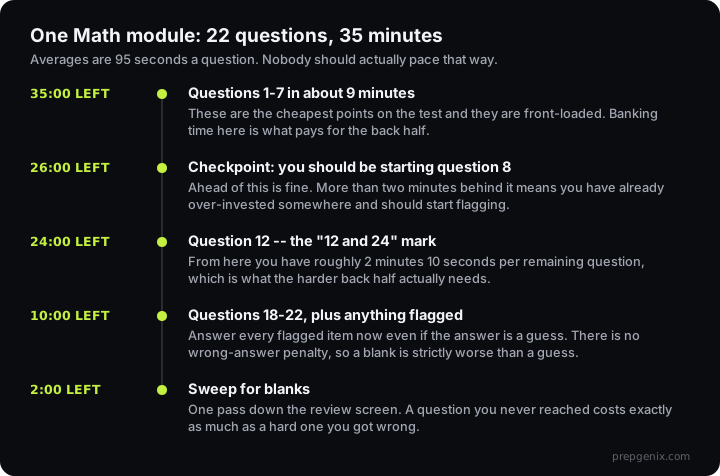
Bank time early, because the early questions are cheap
Questions 1 to 7 of a Math module are the least demanding on the form. Worked cleanly, they take about seven minutes together, well under the 95-second average, and the surplus is what pays for the back half. Module timings are published in College Board's test structure.
The failure mode here is subtle. Students who are anxious about the hard questions rush the easy ones to "save time", make an arithmetic slip, and lose a point they were never going to lose while also not banking much time. Rushing question 3 saves you fifteen seconds and can cost you fifteen scaled points.
When you start question 12, your clock should read about 24 minutes remaining. That leaves roughly 2 minutes 10 seconds for each of the last eleven questions, which is what the harder back half needs. It is one number to remember and it is checkable at a glance. What those saved minutes are worth in points is easy to check in the score calculator.
When you are behind
Being behind a checkpoint is information, not a verdict. The response is mechanical:
- Stop the question you are on. Not after one more line of algebra. Now. The sunk cost is the trap.
- Put an answer down anyway. There is no penalty for a wrong answer on the SAT, so a blank is strictly worse than a guess. Eliminate what you can and pick.
- Flag it and move. The review screen will bring you back if there is time.
- Do not try to make the time back by going faster. You make it back by skipping earlier, not by working sloppily.
The underlying arithmetic is what makes this obvious once you see it. Every question on the SAT is worth the same. A hard question you get wrong after four minutes costs exactly as much as an easy question you never reached, except that the four minutes also cost you the two easy questions at the end of the module that you would have got right. Protecting your ability to reach every question is worth more than perfecting any single one.
The time budget, question by question
| Questions | Target each | Clock should read | Why |
|---|---|---|---|
| 1–7 | ~60 sec | 28:00 left at Q8 | Cheapest points on the form. Bank time here. |
| 8–11 | ~60 sec | 24:00 left at Q12 | Still below the section average. This is what makes the rule work. |
| 12–17 | ~2:00 | 12:00 left at Q18 | The back half needs the surplus you banked. The rule allows 2:10 each; spending 2:00 banks the sweep. |
| 18–22 | ~2:00 | finish ~2:00 spare | Plus any flagged items, answered even if guessed. |
| Grid-ins, wherever they fall | +15–20 sec | No answer choices to work backwards from, and a format to get right. |
Where the 44 questions come from
Pacing decisions get easier when you know what is coming. The Math section follows a published blueprint, and it is heavily concentrated:
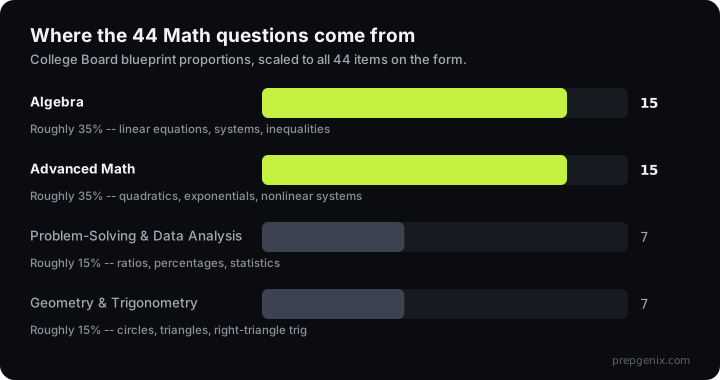
Two consequences for pacing. Most of what you meet will be Algebra or Advanced Math, so your instinct for how long those take is the instinct that matters. And if Geometry and Trigonometry is your weak domain, the correct pacing decision is often to flag those on sight and return at the end. There are only six or seven, and spending three minutes on the first one you see is how a module goes wrong.
The tools, and the time they cost
Desmos is built into Bluebook and it is fast for some question shapes. Graphing a system to find an intersection, checking a quadratic's roots, solving something you would otherwise do by hand. It is also, for a certain kind of student, a way to spend ninety seconds typing an expression that would have taken twenty seconds on paper.
The rule that works: if you know how to do it by hand in under a minute, do it by hand. Reach for Desmos when the alternative is slow or error-prone, not by default. Our Desmos guide covers which question types reward it.
Grid-ins are where the clock disappears
About a quarter of Math questions are student-produced response items with no answer choices. They cost more time than multiple choice for two reasons: you cannot work backwards from options, and you have to think about format. A fraction or a decimal are both fine, negative answers are allowed, and there is a character limit that catches long decimals.
Budget a little extra for these and know the format rules cold before test day, because a correct answer entered wrongly scores zero. We cover the rules in the grid-in guide.
Module 2 is a different pacing problem
Your Module 1 performance routes you into a harder or an easier Module 2, and they need opposite instincts.
On the harder Module 2, expect to be stretched. Flagging two or three questions is normal, not a sign of failure, and the checkpoint discipline matters more than it did in Module 1.
On the easier Module 2, the temptation is to relax, and that is exactly the wrong response. The easier path carries a scaled ceiling around 670 in Math on our model of the curve, which means the attainable range is compressed and every remaining question carries proportionally more weight. You have more time per question than you are used to and less margin for a careless error. Use the surplus to check your work, not to finish early.
How to train this
Pacing is a separate skill from content and it is trained separately. Untimed practice, however diligent, does not build it, and it decays quickly, which is why a student who has not run a timer in two weeks often finishes their first real module three questions short.
- Practice in full 35-minute modules, not in loose sets. The checkpoint only means something inside a real module.
- Write down where you were at 28 and 24 minutes left. Two numbers per module. Patterns show up within a week.
- Count questions you never reached, separately from questions you got wrong. These have completely different fixes and lumping them together hides a pacing problem behind an apparent content problem.
Frequently asked questions
How much time do you get per question on SAT Math?
About 95 seconds on average: 22 questions in 35 minutes per module. Pacing to that average is a mistake, because questions run roughly easy to hard within a module, so early questions should take well under it and later ones well over.
How many questions are on the SAT Math section?
44, split into two modules of 22. Each module is 35 minutes, for 70 minutes of Math in total. Roughly a quarter are student-produced response questions with no answer choices.
What is the 12 and 24 rule on SAT Math?
When you start question 12 of a module, the clock should show about 24 minutes remaining. That leaves roughly 2 minutes 10 seconds for each of the last eleven questions, which is what the harder back half of the module needs.
What should I do if I run out of time on SAT Math?
Answer everything, even if it is a guess. There is no penalty for a wrong answer, so a blank is strictly worse. In the last two minutes, sweep the review screen for unanswered questions rather than trying to finish the one you are on.
Is it better to skip hard SAT Math questions?
Usually yes, temporarily. Every question is worth the same, so four minutes on one hard question can cost you two easy ones at the end of the module. Flag it, put an answer down, and come back if the review screen leaves you time.
Which Math domain has the most questions on the SAT?
Algebra and Advanced Math are tied at roughly 35% each, about 14 to 17 questions apiece of the 44. Problem-Solving and Data Analysis and Geometry and Trigonometry are about 15% each, or six to eight questions.
Should I use Desmos on every SAT Math question?
No. If you can do it by hand in under a minute, do it by hand. Desmos is fast for graphing systems, checking roots and avoiding error-prone arithmetic, and slow for anything you already know how to solve directly.
Does pacing change between Module 1 and Module 2?
Yes, and in opposite directions depending on routing. The harder Module 2 needs stricter checkpoint discipline and flagging two or three questions is normal. The easier Module 2 gives you more time per question but carries a scaled ceiling near 670, so the margin for a careless error is smaller. Use the surplus to check work.